Security operations

A guard can't clock in on an expired licence.

Licences expire quietly, and posts still need covering. CrewOS checks the guard's licence is current before they clock in, so a lapsed one stops the shift instead of surfacing in an audit.
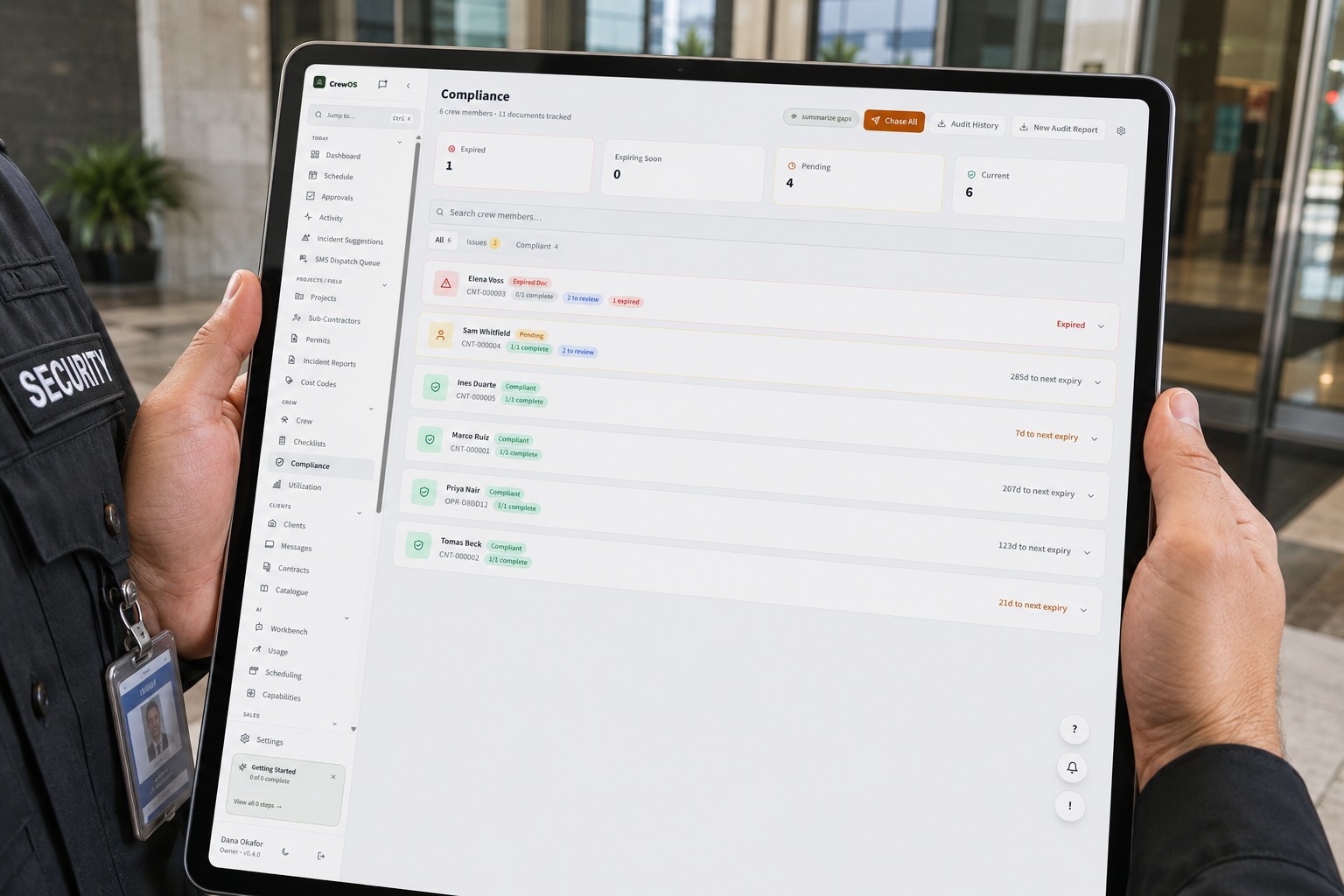
A uniformed security guard at a building lobby holding a tablet that shows the CrewOS compliance board tracking each guard's licence and its expiry
The expensive failure

A guard gets scheduled for a post they are not licensed to work.

The licence lapsed last month, or it was never the right class for that account, and nobody caught it. The guard shows up, clocks in, and works the patrol. On paper everything looks fine, right up until it does not.

What it costs

You usually find out when the client's auditor does.

An expired licence on a covered post can mean regulatory exposure, an emergency replacement at the worst possible hour, and an account that starts asking what else you are not checking. The cost is rarely the fine. It is the contract.

A uniformed security guard on night patrol in a commercial building lobby, a flashlight in hand and a radio on the shoulder
The presence that keeps a property covered, shift after shift.
Operator control

The clock-in gate is yours to set, document by document.

You decide what gets checked, on which jobs, and how hard the system holds the line.
app.crewos.ca/settings
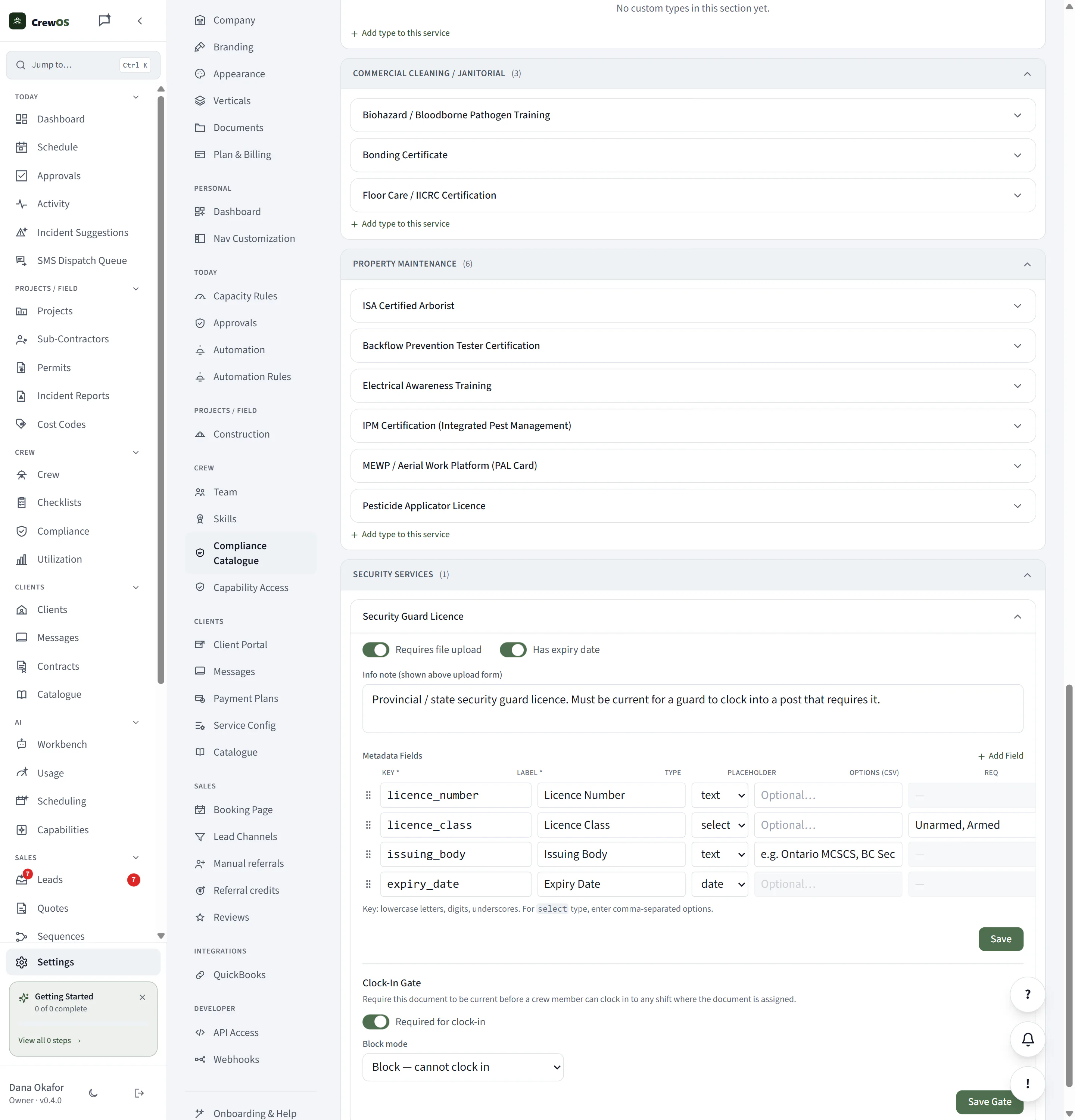
The switch is yours. On the Guard Licence document type you turn on "required for clock-in" and choose whether an out-of-date licence warns or hard-blocks. Set it once, per document, and the gate is live.
You decide which documents gate a post and how hard the line holds. Nothing is enforced that you did not choose to enforce.The switch is yours. On the Guard Licence document type you turn on "required for clock-in" and choose whether an out-of-date licence warns or hard-blocks. Set it once, per document, and the gate is live.
What the system will not let happen

The licence is tied to the post, and checked before the clock-in.

  1. 1You mark a licence as required for clock-in on the posts that need it, per document type, in the compliance catalogue.
  2. 2CrewOS tracks each guard's licence and counts down to its expiry, so a lapse is visible before it happens, not after.
  3. 3At the post, an expired or missing required licence can't satisfy the shift, so the guard can't clock in. The gate is the backstop, and it doesn't rely on anyone remembering.
Real product, real screens

See it happen.

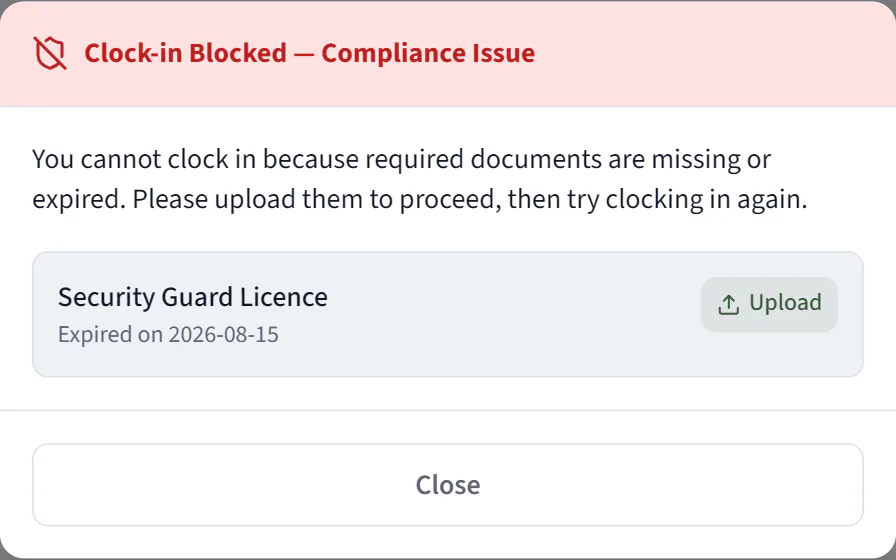
The guard is at the post and taps Clock In. CrewOS refuses it, because the Security Guard Licence that post requires expired on the 15th. This dialog is what the guard gets, in place of a started shift.
Not a warning, a stop. An expired required licence cannot satisfy the post, so the shift never starts and an ineligible guard cannot quietly work the patrol.The guard is at the post and taps Clock In. CrewOS refuses it, because the Security Guard Licence that post requires expired on the 15th. This dialog is what the guard gets, in place of a started shift.
The direct answer

Can CrewOS stop a guard with an expired licence from clocking in?

Yes, where that licence is set as required for clock-in. CrewOS checks the assigned document is current before the guard can clock into a shift that requires it. An expired or missing licence is not current, so the clock-in is blocked until it is renewed.

The requirement is set per document type in the compliance catalogue, and it reads from the licence's own expiry date. A licence that lapses overnight blocks the next clock-in without anyone re-checking.

The outcome

Nobody works a post they are not cleared for.

The check runs every time, not only when someone remembers it. Your guards stay eligible, your accounts stay covered, and the thing you can least afford to get wrong stops riding on memory.

One platform, your words

Configured in Security terms, out of the box.

SitePost
Crew memberGuard
ShiftPatrol
ClientAccount
Required documentGuard licence
Questions

What operators ask before they switch.

Does every document block clock-in, or just the ones I choose?
Only the ones you choose. Each document type in the compliance catalogue carries its own clock-in gate rule, so you decide which documents are hard requirements for a post and which are simply tracked.
How does CrewOS know a licence expired?
Each licence carries an expiry date. CrewOS tracks the countdown, flags it as expiring soon, then expired. Once it is expired it is no longer current, so it stops satisfying a clock-in gate that requires it.
Does the check only happen at clock-in?
No. CrewOS also finds available crew by skill when you build the schedule, so an ineligible assignment is easier to avoid before the shift ever starts. The clock-in gate is the backstop at the post.

Run your crew like you've got it together. Because now you do.

Set up your first site in an afternoon. Free to start, no card required.